Suppose you have a Tekla model and you want to programmatically filter for parts with a revision mark of abc/1. How would you do that?
One way would be to iterate through the entire model, check for items which match your condition (perhaps via a LINQ query).
The second would be to use Tekla’s native filtering metchnicsms, which seem to be FAST:
When I originally tried the code, I had a single Binary Filter expression for just the part Position Number. I made a fatal mistake – I had assumed that Tekla would be smart enough to release that given I want a part position number, I also wanted a part. The API returned almost everything under the sun. And I have no idea why. So then I added a second Binary filter expression – this time one for parts.
Given we have two “filters”, we need to add them into a filter collection, and then finally, when we search, we search by .GetObjectsByFilter(filterCollection).
Add “set XS_PLUGIN_DEVELOPER_MODE=true” to the teklastructures.ini file and open Tekla Structures. – Trimble Documentation
In order to add the flag above, you need to locate the ‘teklastructures.ini’ file: on my PC: it is here: `D:\Program Files\Tekla Structures\2019.1\nt\bin` (refer to the above URL) – it might be in the C: drive on your computer.
As you can see they are basically .bat files. Which means you can use “MS-DOS Batch File Language” or batch commands in there. The MSFT documentation suggests you can also use PowerShell (https://learn.microsoft.com/en-us/powershell/scripting/overview?view=powershell-7.4) script commands.
Here is the post build event I used:
The Tekla documentation is confused about where to paste the DLL – in some cases they say the ‘plugins’ folder, but in others, it is the ‘extensions’ folder. Yet elsewhere, different Tekla versions have different places where you can paste it. In my case, I have focused on the “extensions” directory.
Warning: If you paste it into multiple locations, you may find that you cannot hit break points! The above link suggests the files should be copied into the .environments/common/extensions folder. I am taking that to mean, in actuality: the `Environments/common/extensions` folder. I am not pasting it into the `plugins` folder, but have opted for the `extensions` folder.
If you want to use the plugins folder, follow these instructions: The dll containing the plug-in has to be copied into: \<Tekla Structures installation folder>\<version>\nt\bin\plugins. A sub-folder could also be created to store the dll. In my case, the plugin files are located here: D:\Program Files\Tekla Structures\2019.1\nt\bin\plugins\TestWPFBeamPlugin
Setting up a macro:
Run the UI macro (Reloadplugins.cs) in the Applications & Components catalog on the side pane. We must set it up. In my system, the location is at the following:
Normally in Tekla, if we want to copy objects or components from one object to another, we have to follow these steps :
Select the objects and components you want to copy.
Execute the “Copy to Another Object” command.
Choose the source object.
Select the destination object.
The objects will be copied by reference, aligning their coordination system with that of the source object to the destination object’s coordination system.
Please note that the coordination system is used to ensure the accurate positioning of the copied objects in relation to the source and destination objects.
Macro: Copy to another object multiple
The command “Copy to Another Object” poses an issue when used in Tekla. It does not allow the selection of multiple destination objects at once; instead, we can only choose them one by one. This limitation can be time-consuming, particularly when working on large projects.
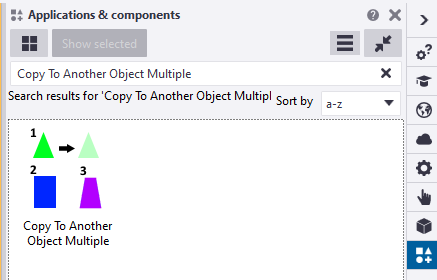
Tekla offers a macro called “Copy to Another Object Multiple” that fulfills the requirement of selecting multiple destination objects. This macro functions similarly to the command mentioned earlier. First, we need to select the objects before running the macro. Once the macro is executed, it prompts us to select an object. Then, we select one source part, after which we can conveniently use drag selection to choose multiple destination objects. Finally, press the mouse middle button.
the snapshot was taken on Tekla version 2022
You can find this macro in the Applications & Components catalog of Tekla Structures.
Introducing a New Approach: The Modified Implementation for Copying Objects in Tekla
The ‘Copy to Another Object‘ command works by copying objects in relation to the source object and pasting them according to the destination objects
The coordination system plays a crucial role in defining the position and rotation of a part in Tekla
It is primarily based on the start handle of the part
Altering the coordination system of a part is not possible
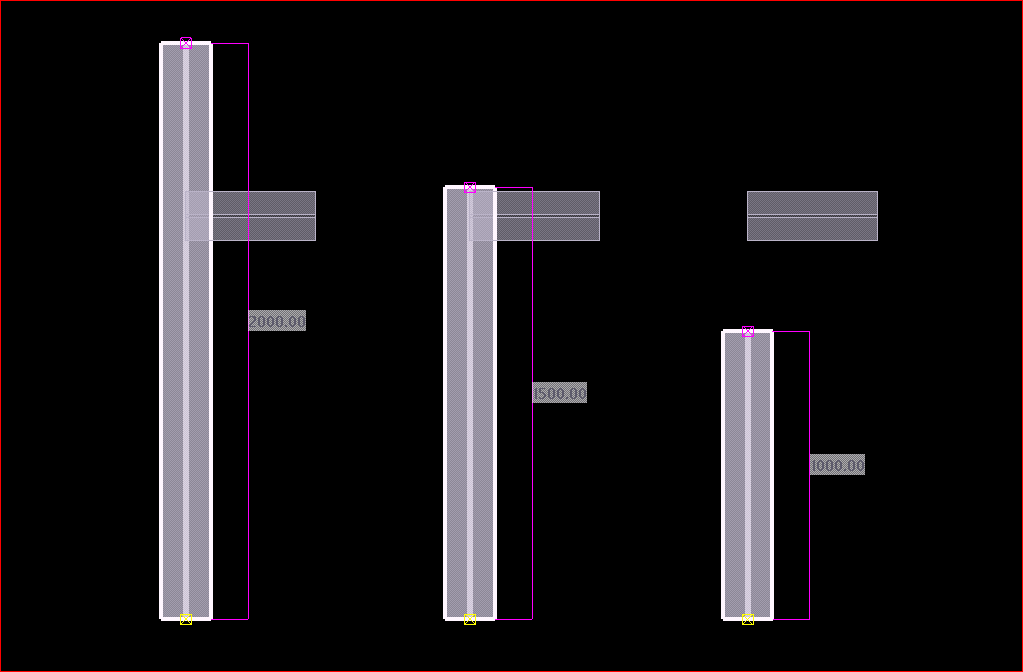
If the destination object’s lengths differ from the source object, a problem arises where the objects are positioned based on the start point
After copying the small beam to other destination objects of varying lengths
In many situations, we often find ourselves having to manually utilize the ‘Copy Linear’ or ‘Move Linear’ commands to perform copying tasks.
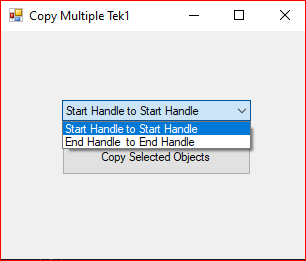
We utilized the Tekla API to Create a new macro that helps to copy objects in relation to the end handle of the part. When executing this macro, it prompts the user to select the desired handling method for copying objects
This is the dialog box that appears while running the modified “Copy Multiple Tek1” macro.
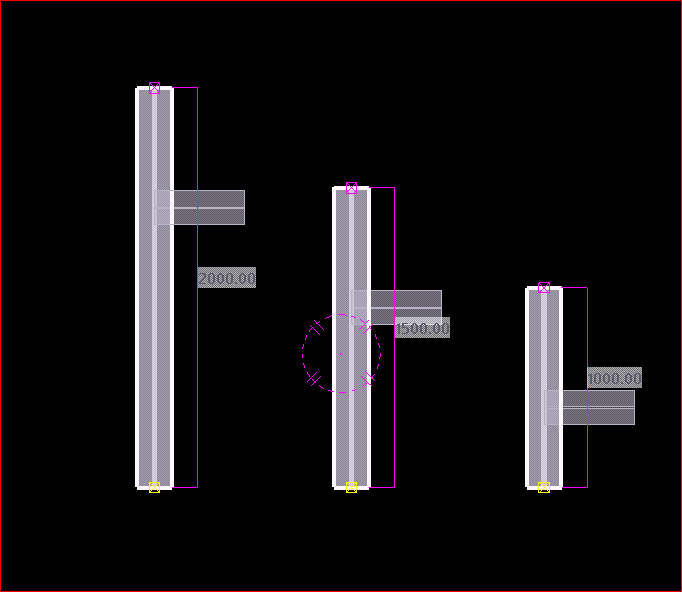
When the “End Handle to End Handle Copy” option is selected, the operation produces an outcome that is similar to the image shown.
members of the Tek1 organization can download the tsep installer file of the above macro by clicking the download button
You want to programmatically create reports. Here’s how
Reports can be generated fairly easily, manually. But how do you do it programmatically using the Tekla Open API?
Please see below for a code sample:
Programmatically Extracting Report Values
Now, if you want to generate the values programmatically, in memory, and then process them somehow into an excel output, consider the following code sample here.
If you want to programmatically select model objects, refer to the code pasted above.
The question: how to generate generate excel files given a particular hash table – this is not an issue pertaining to the Tekla Open API specifically though. I would use a library like CSV Helper to create a series of rows from the hash table.